ERP to E-Commerce
Publish product and available inventory data from the ERP, receive storefront orders, and return fulfillment updates. Agree on how cancellations and partial shipments affect each system.
API, ERP & EDI Integrations
Make business applications work together with reliable integrations that improve information flow, reduce unnecessary manual work, and support critical operations.
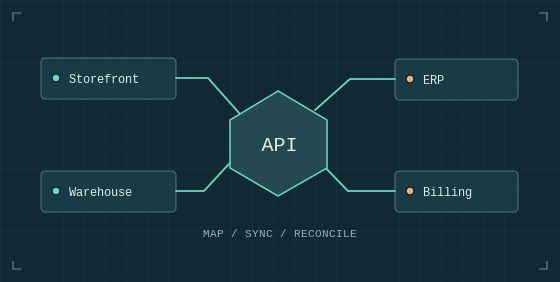
An order can mean different things to a storefront, an ERP, and a warehouse. Before connecting them, we define which system creates the order, which can update it, and how each recognizes the same customer and item.
That agreement becomes a field map and an interface contract. Sample records help validate units, identifiers, time zones, and the exceptions that cause real transactions to stall.
Illustrative integration use cases
Publish product and available inventory data from the ERP, receive storefront orders, and return fulfillment updates. Agree on how cancellations and partial shipments affect each system.
Map purchase orders, invoices, and shipping notices to a partner’s specifications. Track acknowledgments and flag missing or rejected documents for the operations team.
Use a shared customer identifier to synchronize approved account details. Route ambiguous matches and changes to billing terms to the person authorized to resolve them.
Wrap a supported legacy export or interface in a service that newer applications can use. Validate formats and respect the older system’s processing window.
Explore legacy modernizationCoordinate sales, warehouse, and finance updates around one order. Keep a record of which steps completed so an operator can resolve a failure at the right point.
Healthcare engineering
A coordinator sends a referral, then calls the receiving office to find out whether it arrived. An integration can turn that handoff into a work item with a reference number, an owner, and a status both teams recognize.
Other starting points include appointment changes for a scheduling team and encounter notifications for authorized care operations staff. For each exchange, we agree on the identifier, the receiving team, and what an acknowledgment means.
We scope electronic medical record (EMR) and electronic health record (EHR) connections around each site's supported interfaces, such as HL7 v2 messages or FHIR APIs. Discovery covers permitted reads and writes, patient matching, test access, and who resolves a mismatch. Epic interface specifications · Oracle Health Millennium APIs
Discuss an EMR integrationFor U.S. projects involving electronic protected health information, we work with the organization’s privacy and security leads to map data flows, review risk, and identify required business associate agreements before production access. We agree on role-based access, audit events, permitted log content, and who responds to incidents. HHS guidance on cloud services and HIPAA
In a fictional referral rollout, the handoff includes an interface map, a queue for unmatched records, and a replay test. A synthetic batch contains 92 distinct valid referrals, five repeats of those referrals, and three messages missing an identifier. The expected result is 92 work items, five duplicates suppressed, and three exceptions for staff to review.
“When a referral is missing an identifier, I can see exactly what to follow up on. I don’t have to call the receiving office to ask whether it arrived.”
Platform integrations
Your team may need one reliable handoff across several vendors. We confirm the product edition, available APIs, permissions, and system of record before selecting a connector or building a custom exchange.
Discuss your platform stackWhen a deal closes, finance needs the right customer and approved billing details. Map Salesforce opportunities or HubSpot deals to customer accounts, use a stable identifier to prevent duplicates, and return the billing reference to the sales team. Salesforce records API · HubSpot deals API
Route a file in Google Drive or Microsoft 365 to the team that needs to approve it. Link the file to a business record, respect existing permissions, and record the decision in the owning application. Google Workspace APIs · Microsoft Graph
Bring Amazon marketplace and Shopify orders into a fulfillment workflow. Match channel identifiers to ERP orders, track partial shipments, and give warehouse staff a way to investigate quantity differences. Amazon Selling Partner Orders API · Shopify Admin API
Connect a sales order in Microsoft Dynamics 365 Business Central or Oracle NetSuite with invoicing and payment records. Projects can include QuickBooks Online invoice creation or Stripe payment notifications, with reconciliation for partial payments and refunds. Business Central APIs · NetSuite SuiteTalk · QuickBooks invoices · Stripe webhooks
A file arriving in Amazon S3 can start a validation or document-processing job. Give each file a durable reference, handle repeated notifications, and send exceptions to a named team. That team can then trace the input through to the final record. Amazon S3 event notifications
Timeouts, changed item codes, unavailable endpoints, and duplicate events are normal integration conditions. An operating plan should make it clear who sees a problem and how work resumes.
Map your integration requirementsDefine identifiers, duplicate detection, safe retry rules, and a review path for invalid data. Reconcile record counts, totals, or transaction references against the source.
Confirm authentication methods, permissions, and credential rotation. Plan around vendor limits, schema versions, batch windows, and supported legacy interfaces.
Track transaction status without exposing sensitive payloads in logs. Give operators useful alerts, a way to locate the affected record, and instructions for recovery.
System names and versions, sample records with sensitive details removed, vendor documentation, expected volumes, and the business owner of each step give us a starting point.
No. Depending on the platform, an approved file exchange, EDI connection, message queue, or supported database interface may fit the requirement.
That depends on the business decision the data supports. An order status may be time-sensitive, while a nightly financial reconciliation can suit a scheduled exchange.
We agree on sample transactions and expected results with system owners. Testing covers valid records, duplicates, rejections, and recovery, then checks that both sides agree on the final state.
Share the platforms, the records they exchange, and the handoffs your team currently manages. That gives us a starting point for scoping the integration.